
For someone who drools over tech and gadgets, I do spend a great deal of time with my nose buried in good old fashioned paper books. I usually have a fiction, a nonfiction and a technical book going all at once. My library card gets a weekly workout, as we schlep books back and forth from my night stand to the stacks. Not that I don’t like books: I love the way they smell, and I love thumbing through them. They have just become a little cumbersome to carry around, and I am beginning to feel a little green guilt when buying new books and therefore felling part of a forest unnecessarily.
In the quest for something easier and more accessible, I tried a few different approaches. I have used the RCA Ebook, but I found that while it did have several strong points, there were several problems with it. These problems were not really with the product itself, but with the available technology at the time. A good deal of these issues seems to have been fixed in the next generation of ebook readers. Before I could be talked into upgrading to a newer model, there were two huge things that I needed to see addressed: the display and the DRM issues.
I have currently been eyeing two devices, the Sony Reader and the Amazon Kindle. Both devices promise to address the display issue, and for a clever consumer, it seems some workarounds are available for the DRM issues.
The Similarities
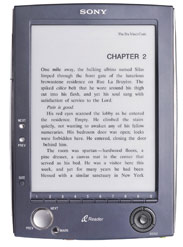 Both devices boast the new technology displays that are supposed to be more like paper than ever. They are not backlit, and are aimed at being “paper-like” in their ability to be read under normal lighting and reading angle circumstances. I have seen neither device in real life, as the Sony is just about impossible to spot in the wild, and Amazon does not have a showroom anywhere. But this would be a deal sealer for me. My biggest beef with the RCA product was that the display was just not “paper-like” yet.
Both devices allow you to import documents, a huge plus for those who already own media for this device. This includes PDF files, Mobipocket files (the Kindle reads these natively), and txt files for those of us who like to grab content off Project Gutenberg. With a little work and planning, a full service reading list can be culled from the internet for free.
Both devices offer online stores for the latest content. The Sony product boasts “Thousands of Titles,” but after spending five minutes trying to get a peek at them, I gave up. Granted, I didn’t try too hard, but I imagine I tried about three minutes longer than most users would. The Kindle has a moderately impressive store that can be browsed online. The Kindle also includes a huge assortment newspaper (with a few notables not present).
The Differences
Content Delivery
This is where the Kindle shines. To purchase content on the Sony product, you connect your device to your computer via USB and purchase and download content to the device. This is where I tend to run into problems. I use several computers, and in no case do I run Windows. Keeping track of all this DRM’d material over different computers is hideous and impossible. The Kindle has taken a different route, becoming self reliant. Rather than require a connection to a computer or a wi-fi network, it piggybacks on Sprint’s EVDO network. This allows the user to connect anywhere an EVDO is handy, and browse and purchase books in less than a minute. This means you can sit in the airport, in the park, or in your bed, and browse stacks and purchase books. Any books that you buy are also noted by Amazon, so if you lose your Kindle or upgrade it in the future, you don’t lose your content (iTunes, take note!)
Because the delivery system is always on, content is pushed to the device, rather than pulled from it, meaning that when a newspaper is ready for delivery, it is automatically downloaded to your device. There is no need to connect to the network to see if your subscribed content is available. Kindle offers not only a wide selection of newspapers, but a growing selection of blogs and magazines, all pushed to your device.
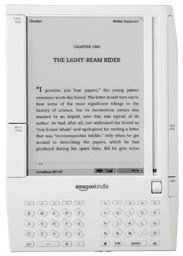 The inclusion of “always on” networking allows the Kindle do some interesting and useful tricks. Rather than attempting to include a full-fledged Web browser or e-mail reader (most anyone who purchases this for travel most likely owns a laptop anyway), the Kindle includes only parts of the Web that might be useful to a reader: access to Wikipedia, free sample chapters from most of the books in the store and a context-sensitive dictionary.
The Price Tag
Neither device comes cheap. The Sony will set you back $299 and the Kindle will set you back $399. The Sony comes with a standard set of plugs and cables and some free classic books (read “free on project gutenberg”). The Kindle comes with plugs and cables, but something a little more subtle. Free connection to the networks. This means that once you pay the $399 entry fee, you can use Wikipedia and the bookstore without worrying about recurring charges or annoying subscriptions.
Books run about ten bucks for a best seller, and magazines and newspapers are offered at a significant price cut from their pulp counterparts. The Kindle offers free two week trials on their newspapers, which could make curious readers like me default subscribers. Although the prices for books and media could be argued either way, the price for media is not cheap, but it’s not prohibitive.
Style and Culture
Unfortunately, I have yet to see either one of these products in real life. We were not provided with review units, so I can only speak from the spec sheets and photos if have seen. The fact is, neither device will win any design awards. The Sony device looks very much, well, Sony. The Kindle looks very much clinical. Neither product looks in any way sexy, but I suppose we are reading it, not dating it. As someone who would carry this around in my bag, I would like it to look a little more presentable.
Both units force me to address some very important issues in book culture. While I do purchase a lot of books (I have an amazon prime account), I do tend to pick up lots of reading material at the local library. This means I can grab a book that I may not want to add to my personal library for free, and give it back when I am done. Until I find a library that deals in ebooks (I have heard rumors of such a thing), the days of grabbing a New York Times bestseller and reading it for free are over. I also have a habit of trading books when I am done with them, or giving them to friends who I think might enjoy them. The EULA for these books now makes this illegal.
The Verdict
After looking at all the options, I would definitely end up going with the Kindle. The online delivery system is smart and well played, and the amount of paper I would save by dumping my pulp newspapers for online versions would make me feel much greener. Unfortunately, I am not about to pay $399 for a product that I can’t first go to the store and touch before buying. Even though I tend to trust the folks I read who gush about the display on these new generation devices, I need to see it before I believe it.
By Sergio Ruiz
